


A good disaster recovery plan template is more than just a document; it’s a pre-built roadmap for your business to follow when things go sideways. Think of it as your playbook for getting back on your feet after a major disruption, whether that’s a server crash, a cyberattack, or a natural disaster. It turns the chaos of an emergency into a series of clear, actionable steps.
Why You Can't Afford to "Wing It" With a Disaster Plan

Let's get real for a moment. When people hear "disaster," they often think of floods or fires. But for most businesses, the real threat is far more common. Imagine your main server giving out during the holiday rush, or a ransomware attack encrypting every single customer file you have. These aren't just hypotheticals; they happen every day and can bring a company to its knees.
When you don't have a plan, the fallout is about much more than just the initial financial hit. The true cost of downtime is a ripple effect that can seriously damage your business from the inside out.
The Real Cost of Being Unprepared
Every minute your operations are down, you're not just losing money. You're losing trust. A customer who can’t reach you will find a competitor who’s available in a heartbeat. Winning back that trust is a long, uphill battle you might not win.
Beyond that, extended outages create internal chaos. Your team is stressed, morale plummets, and you could even face legal trouble if sensitive data is compromised. Without a clear plan, people are forced to make high-stakes decisions under extreme pressure—a perfect recipe for expensive mistakes.
Even with these massive risks, it's shocking how many companies are rolling the dice. A 2019 global survey found that only about 54% of organizations had a company-wide disaster recovery plan in place. That leaves nearly half of all businesses completely exposed, essentially hoping for the best. You can find more eye-opening numbers in this comprehensive disaster recovery statistics report.
A disaster recovery plan isn't just a technical document for the IT department. It's a fundamental business survival guide. It shifts your mindset from if a disaster will happen to when it happens, ensuring you have the resilience to handle it.
Your Blueprint for Business Resilience
This is exactly where a disaster recovery plan template shows its value. It gives you a solid foundation to build a strategy that fits your specific business needs. A good template makes sure you cover all the critical bases, from communication plans and team responsibilities to the step-by-step procedures for recovery.
Starting with a template takes the guesswork out of the process, breaking down a daunting task into manageable pieces. It provides a clear path forward for:
- Identifying what matters most: Figuring out which systems, data, and applications are absolutely essential to keep the lights on.
- Defining recovery goals: Setting clear, realistic targets for how quickly you need to be operational again.
- Assigning clear roles and duties: Making sure everyone knows exactly what they need to do when an incident hits.
At the end of the day, a well-thought-out plan, backed by professional IT and cybersecurity expertise, is what separates a minor hiccup from a catastrophic failure. For more on how the right support can fortify your defenses, check out our guide on why every San Antonio business needs managed IT and cybersecurity services.
Getting Real About Your Risks and Business Impact

Before you can even think about a recovery strategy, you need to know exactly what you're protecting and what you're up against. This is where two crucial activities come into play: a Risk Assessment and a Business Impact Analysis (BIA). These aren't just bureaucratic chores to tick off a list; they’re the reconnaissance work that gives your disaster recovery plan its purpose and power.
The risk assessment is essentially a structured brainstorming session about everything that could possibly go wrong. We're not just talking about massive catastrophes, but any threat—big or small—that could throw a wrench in your operations. The whole point is to get a brutally honest picture of your vulnerabilities so you can prioritize what to defend first.
The BIA, on the other hand, is all about figuring out which parts of your business are absolutely essential. It answers one simple question: "If this system or process went down, how much would it hurt?" The answer tells you where to focus your resources when the pressure is on.
Pinpointing Your Mission-Critical Functions
First things first, make a list of every key process that keeps your business running. And don't just think about the tech. What operations actually generate revenue or keep customers happy? This could be your CRM, your e-commerce site, or even the old-school phone system your sales team can't live without.
For each function on that list, get your team in a room and ask a simple question: "What happens if this stops working for an hour? A day? A week?" Trust me, this exercise will quickly show you what's truly non-negotiable.
Your list of critical functions might look something like this:
- Customer order processing: If this goes down, the money stops coming in. Simple as that.
- Inventory management system: You can't fulfill orders or restock if this fails.
- Primary database server: This is the heart of everything, holding all your customer and product data.
- VoIP phone system: Critical for sales, customer support, and just about all internal communication.
A Business Impact Analysis isn't about creating a perfect, exhaustive document. It's about building a consensus on what truly keeps the lights on so you can protect those assets above all else.
Mapping Out Potential Threats
Once you know what’s most important, you can start identifying the threats that could take those functions offline. I find it helpful to group potential threats into categories—it makes the whole process feel less overwhelming and ensures you cover all your bases.
Think broadly here. Consider threats from both inside and outside your company. A server crashing is an internal problem, while a city-wide power outage is an external one. In my experience, a good disaster recovery plan template has to account for both. And with cyber threats getting more sophisticated every day, understanding the importance of cybersecurity for growing businesses has never been more vital.
Here’s a simple framework I use to categorize threats:
| Threat Category | Example Scenarios | Potential Business Impact |
|---|---|---|
| Technical Failures | Server crash, storage failure, network outage | Data loss, service unavailability, lost sales |
| Cybersecurity Incidents | Ransomware attack, phishing, data breach | Data theft, reputational damage, regulatory fines |
| Human Error | Accidental data deletion, misconfiguration | Operational disruption, recovery costs |
| Environmental Events | Fire, flood, severe weather, power outage | Physical damage, office inaccessibility |
Taking this kind of structured approach turns abstract worries into a concrete list of scenarios you can actually plan for.
Setting Realistic Recovery Goals with RTO and RPO
Once you’ve mapped out your critical systems, it’s time to get real about how quickly you need them back up and running after a disaster. This is where two of the most crucial metrics in business continuity come into play: the Recovery Time Objective (RTO) and the Recovery Point Objective (RPO).
Nailing down your RTO and RPO is non-negotiable. These two numbers will shape your entire recovery strategy, influencing everything from the technology you invest in to the procedures your team follows.
Here’s a simple way I like to explain it:
- RTO is all about time. Think of it as a stopwatch. It’s the maximum acceptable downtime you can afford for a specific system before the business really starts to hurt.
- RPO is all about data. This is about how much data you can stand to lose. It’s measured in time before the disaster and dictates how often you need to be saving your information.
Let's break down how to think about each one for your own plan.
Defining Your RTO: How Fast Is Fast Enough?
Your RTO isn’t some arbitrary number you pick from a hat—it’s a calculated business decision. A system that directly generates revenue or serves customers will naturally have a much shorter, more aggressive RTO than an internal-only tool.
For instance, a busy e-commerce website could be losing thousands of dollars for every minute it’s offline. The brand damage alone is a huge motivator. In that scenario, an RTO of minutes, not hours, is essential.
On the other hand, what if the internal marketing team’s project management board goes down? While it's certainly an inconvenience, a 24-hour RTO might be perfectly fine. The key is to look at each system through the lens of business impact.
Understanding Your RPO: How Much Data Can You Afford to Lose?
Just like RTO, your RPO is tied directly to the nature of the system. The core question here is: how quickly does the data change?
A transactional database for an online service, processing hundreds of customer orders a minute, needs an extremely low RPO. Losing even a few minutes of that data could be a logistical and financial nightmare. This requires near-constant data protection.
Setting an RPO of 15 minutes means you've made a business decision that you can live with losing up to 15 minutes of work or transactions. This directly translates into a technical requirement: your data must be backed up or replicated at least every 15 minutes.
Unfortunately, there's often a major gap between what business leaders want and what their current setup can actually deliver. Research shows that a startling 17% of SMB executives don't even know their organization's RTO. Even more telling, 24% expect a full recovery in under 10 minutes—a demanding target that requires sophisticated (and often costly) solutions.
To hit those really tight recovery goals, especially for your most critical databases, you often need more than just traditional backups. This is where tools like database replication software come in, allowing for near-real-time data copies.
The biggest mistake you can make is setting RTO and RPO goals that are completely disconnected from your budget and technical reality. A plan built on wishful thinking is a plan destined to fail. Be brutally honest about the real-world impact of an outage for each system, and create achievable targets that give you real protection without bankrupting the company.
Building Your Disaster Recovery Plan Template
Alright, let's get to the core of it—actually putting together your disaster recovery plan template. This isn't about creating one massive, intimidating document. Think of it more like a living framework, a collection of essential sections that bring clarity and direction when a crisis hits. A well-built template is what turns the chaos of a disaster into a manageable checklist, ensuring nothing critical gets missed when the pressure is on.
Instead of a single, monolithic plan, I always advise clients to create a series of targeted playbooks. Each one can tackle a specific piece of the response, from immediate, on-the-ground actions to the nitty-gritty of long-term technical recovery. This modular approach makes the entire plan much easier to build, keep up-to-date, and, most importantly, actually use in an emergency.
This infographic gives you a great visual overview of the key stages involved in building a solid plan.
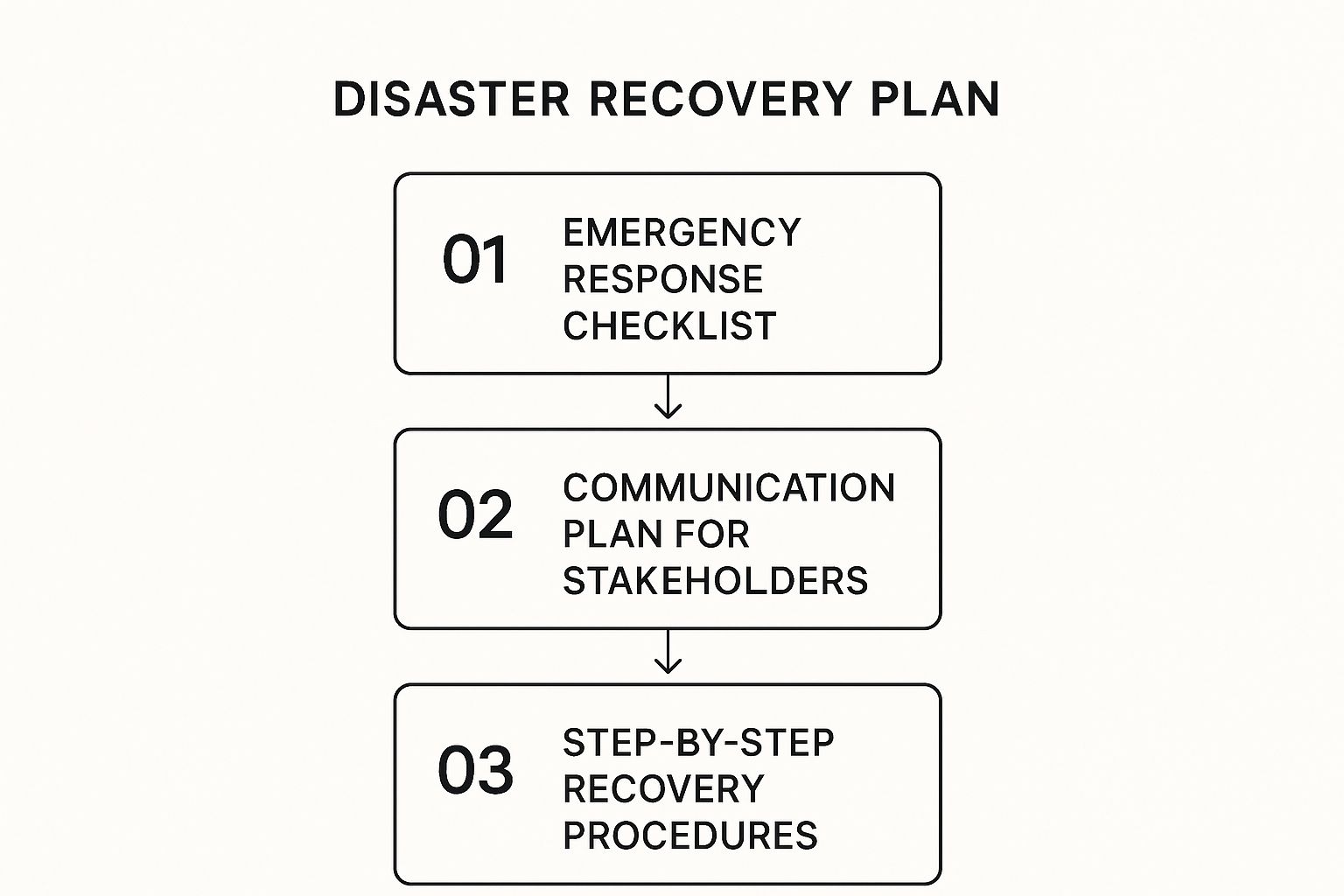
As you can see, a successful plan has a logical flow. It starts with immediate response, moves into clear communication with everyone who matters, and then dives into the detailed technical work. It’s all about covering your bases.
Defining Your Disaster Recovery Team Roles
Your first real move is to officially establish your Disaster Recovery (DR) Team. This needs to be more than just a list of names; it has to be a rock-solid chain of command. When an incident strikes, ambiguity is your worst enemy. Everyone involved must know exactly what their job is and who has the final say on critical decisions.
A classic mistake I see is people assigning these roles based purely on day-to-day job titles. You really need to think about who has the practical skills and, just as importantly, the temperament to act effectively under extreme stress. The person who expertly manages your IT on a normal Tuesday might not be the best crisis communicator.
To help you get started, here's a look at some typical roles you'll want to fill.
Sample Disaster Recovery Team Roles
A clearly defined team ensures everyone knows their part when seconds count. Use this structure to map out your own response team, filling in the contact details for each designated person.
| Role | Key Responsibilities During a Disaster | Contact Placeholder |
|---|---|---|
| DR Coordinator | Activates the plan, leads the response team, and acts as the final decision-maker. | [Name, Email, Cell] |
| IT Recovery Lead | Manages the technical team to restore systems, data, and network connectivity. | [Name, Email, Cell] |
| Communications Lead | Handles all internal and external messaging to employees, customers, and partners. | [Name, Email, Cell] |
| Business Ops Lead | Coordinates with department heads to implement manual workarounds and manage non-technical recovery. | [Name, Email, Cell] |
Having this table filled out and accessible offline is a simple step that can save you a world of confusion during a real event.
Crafting a Foolproof Communication Plan
How you communicate during and after a disaster can literally make or break your company’s reputation. A well-thought-out communication plan ensures your messaging is consistent, timely, and accurate. The entire goal is to control the narrative yourself and stop rumors or misinformation from taking over.
Your plan should absolutely include pre-written message templates for different audiences and potential scenarios. Having these ready to go saves precious time and dramatically reduces the risk of sending out a poorly worded message in the heat of the moment.
Your communication plan should operate on the principle of "if you don't tell them, they'll make it up." Proactive, honest communication builds trust even when your systems are down.
Here are the must-have components for your communication plan:
- Stakeholder Contact Lists: You need updated, offline-accessible lists for all employees, key clients, critical vendors, and even media contacts.
- Primary Communication Channels: Designate the official places people should go for updates, like a dedicated status page, a specific social media account, or an emergency text service.
- Message Templates: Prepare adaptable scripts for that first incident notification, ongoing progress updates, and the final resolution announcement. Make sure you have versions for each key audience.
For a practical example of a structured DRP, you can explore a detailed disaster recovery planning template designed for businesses facing diverse challenges.
Documenting Step-by-Step Recovery Procedures
Now we get to the most technical part of your disaster recovery plan template. This section holds the specific, sequential instructions for restoring every critical system you identified back in your Business Impact Analysis. These procedures must be so clear that a qualified technician who isn't familiar with your environment could pick them up and follow along.
Don't write a novel here. Use checklists, bullet points, and diagrams to make the information as scannable as possible. A technician trying to restore a server at 3 AM isn't going to wade through dense paragraphs of text.
For businesses that want expert guidance in shoring up their IT defenses, exploring professional managed IT services can provide the deep expertise and hands-on support needed for a truly resilient recovery strategy.
How to Test and Maintain Your DRP

You’ve put in the hard work and created a disaster recovery plan. That’s a massive step, but let's be honest: a plan that just gathers dust on a server is more of a liability than a lifeline. Its real worth is only revealed when you know, for a fact, that it actually works.
Think of it like a fire drill. You don't just write down the evacuation route and call it a day; you practice it. The same principle is at play here. The point isn’t just to check a box. It’s about building confidence and muscle memory so your team can act decisively when the pressure is on.
Choosing the Right Testing Method
Jumping into a full-scale shutdown simulation on day one is a recipe for chaos. The smartest approach is to start small and gradually increase the complexity. This makes testing less disruptive and far more manageable.
You have a few solid options for validating your DRP, each with a different level of intensity:
- Tabletop Exercises: This is your starting line. Get the disaster recovery team in a room, throw a hypothetical scenario at them—like a sudden ransomware attack—and have them talk through every step of the plan. It's a low-stress way to uncover glaring holes in logic or communication.
- Walkthrough Drills: This takes it a step further. Team members physically go through the motions of their assigned tasks without actually shutting down live systems. For instance, your IT lead might confirm they can access the backup server, while your communications manager drafts a mock customer notification.
- Failover Simulations: Now we're getting more technical. Here, you intentionally simulate a system failure to see if the redundant system kicks in as planned. This is absolutely critical for proving you can meet your RTO and RPO targets for essential applications.
Setting a Rhythm for Reviews and Updates
Your disaster recovery plan is a snapshot of your business right now. But businesses don't stand still. You bring in new software, people change roles, and priorities evolve. Your DRP needs to keep pace with your organization.
An outdated plan can be more dangerous than no plan at all. It creates a false sense of security while pointing your team toward obsolete procedures or people who left the company months ago.
To stop your plan from becoming irrelevant, put a formal review schedule on the calendar. A quarterly check-in is perfect for updating contact lists and making minor procedural adjustments. Then, schedule a comprehensive, top-to-bottom review at least once a year.
Expert Tip: A great way to stay on top of this is to link DRP reviews to other business milestones. Just migrated to a new cloud provider? Hired a new C-level executive? These are natural triggers to pull out the plan and make sure it aligns with your new reality.
After every single test, hold a debriefing session. Talk openly about what went right, what went wrong, and what was just plain confusing. Use that direct feedback to update the plan immediately. This cycle of testing and refining is what transforms your DRP from a static document into a truly effective recovery tool.
Got Questions About DRPs? We’ve Got Answers.
Even the best-laid plans can leave you with a few lingering questions. That's perfectly normal. Let's tackle some of the most common ones we hear from business owners so you can move forward with confidence.
How Often Should I Actually Test My Disaster Recovery Plan?
The standard answer is at least annually. But let's be realistic—that's just the bare minimum.
If your business is constantly evolving, or you handle sensitive information, you should be running tabletop exercises quarterly. Think of it as a quick fire drill. More importantly, you absolutely need to run a full test after any major change to your IT setup. Migrating to the cloud? New critical software? Major hardware upgrade? Test the plan.
Your DRP needs to reflect your business today, not what it looked like six months ago. An outdated plan is almost as risky as having no plan at all.
What's the Real Difference Between a DRP and a BCP?
This one trips people up all the time, but the distinction is pretty simple when you break it down. A Disaster Recovery Plan (DRP) is a highly technical, focused piece of a much larger puzzle called a Business Continuity Plan (BCP).
Here’s how to think about it:
-
DRP (Disaster Recovery Plan): This is the IT team's playbook. It’s all about the tech—restoring servers, getting applications back online, and recovering data after a disaster. The central question it answers is, "How do we get our systems running again?"
-
BCP (Business Continuity Plan): This is the C-suite's master strategy. It covers the entire business. Who works from where? How do we handle payroll? How do we keep communicating with customers and suppliers? It ensures the whole operation stays afloat.
A DRP gets your servers humming again, but a BCP makes sure your people have a place to work and your customers know you haven't disappeared. You truly need both to be resilient.
Can a Small Business Really Build a DRP Without a Huge IT Team?
Yes, absolutely. In fact, this is where a solid disaster recovery plan template becomes a small business's best friend. It gives you a proven framework to build on.
Your plan doesn't need to be as complex as a Fortune 500 company's. The key is to be brutally honest about what's truly essential. Identify the handful of systems and data sets you absolutely cannot function without.
Lean on cloud services like Microsoft 365 or Google Workspace, which already have powerful recovery tools baked right in. Your plan might focus more on clear communication chains and simple, manual workarounds. A simple, well-documented plan is infinitely better than scrambling with nothing when disaster strikes. It provides a clear roadmap in a moment of pure chaos, no matter how small your team is.
Figuring all this out can feel like a heavy lift, but you don't have to go it alone. The experts at Defend IT Services have been in the trenches, helping businesses build, test, and maintain DRPs that actually work. We can help you get prepared for whatever comes next. Learn more about our managed IT and data protection services today.